


Website Traffic but No Qualified Leads? A Page-to-Enquiry Audit Before You Buy More Traffic
If your website gets traffic but few qualified leads, buying more visits can make the problem more expensive. Audit the path from traffic source to qualified inquiry before increasing your SEO or ad budget. The leak may be tracking, audience intent, page messaging, proof, usability, the form itself, or what happens after submission.
This page-to-enquiry audit helps a small business find the first weak link. It is not a hunt for a universal conversion-rate benchmark. A service page, an educational article, and a paid landing page attract different people and should not be judged as if they do the same job.
Key Takeaways
- Confirm that forms, calls, calendars, and analytics record the same real inquiries.
- Segment traffic by source, intent, location, device, and landing page before blaming design.
- Judge pages by qualified leads, not form submissions alone.
- Fix the earliest proven break in the path, then measure before changing the next variable.
First, Prove You Have a Lead Problem
Start by defining what counts. A button click is not a submitted form. A submitted form is not automatically a qualified lead. A qualified lead is not yet a customer. Google Analytics recommends separate lead-generation events for generating, qualifying, disqualifying, working, and closing leads. That distinction prevents a busy-looking dashboard from hiding a weak pipeline.
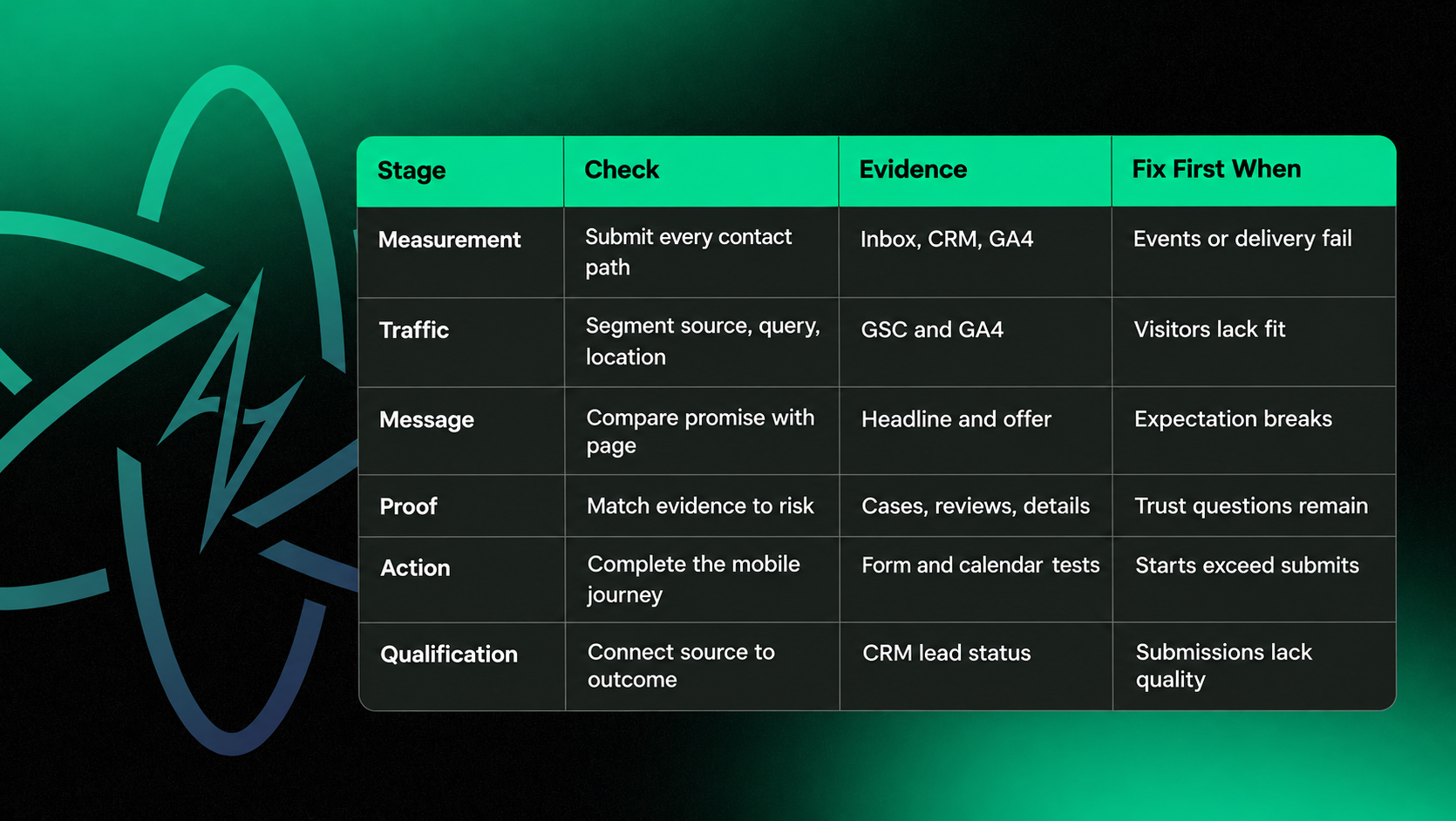
Submit every important form on a phone and desktop. Call each tracked number. Complete each booking flow. Confirm the visitor sees a success message, the business receives the inquiry, the analytics event fires once, and the CRM keeps the source. If any of those steps fail, repair measurement and delivery before rewriting the page.
Use the GA4 Landing page report to compare sessions and key events by entry page. Then connect website data to the CRM so the team can see which pages produce qualified conversations, not just submissions.
Audit the Page-to-Inquiry Path in the Right Order
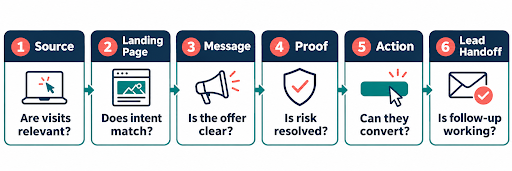
Follow the evidence from arrival to follow-up. Do not start by changing colors, adding pop-ups, or redesigning the entire site. Those changes may affect results, but they do not explain the original failure.
1. Segment Traffic by Intent and Landing Page
A traffic increase can come from broad informational searches, irrelevant locations, referral spam, or low-intent social clicks. In Google Search Console's Performance report, compare queries and pages by clicks, impressions, CTR, and date. In GA4, add session source and medium to the landing-page view.
Look for the page-source pairs that should produce an inquiry. If an SEO article attracts research traffic, its next step may be another guide or service comparison, not an immediate estimate request. Your SEO strategy should bring relevant visitors to pages that can satisfy their intent.
2. Check Message Match and Qualification
The first screen should confirm who the service is for, what problem it solves, where it is available, and what action comes next. For paid traffic, the promise in the ad should continue on the landing page. Google Ads specifically evaluates landing-page relevance and usefulness.
Qualification belongs in the message before it belongs in the form. Name the service area, project type, minimum fit criteria, timeline, or buyer type when those details matter. A short form can still generate poor leads when the page welcomes everyone.
3. Give the Visitor Enough Proof to Decide
Place proof near the claim it supports. Useful proof may include a relevant case study, process explanation, pricing context, service boundaries, credentials, reviews, or answers to common objections. Generic logo walls rarely resolve a specific risk.
For complex B2B services, the website also needs to support independent evaluation. The rep-free selling guide explains how fit, cost, risk, proof, and next steps help buyers qualify themselves before they contact sales. Content marketing can support that evaluation when it answers genuine buyer questions instead of repeating the service page.
4. Remove Friction From the Action
Make the primary action specific and proportional to the page. A visitor comparing a complex service may want an estimate, consultation, example, or scope discussion. Avoid sending every page to a generic contact form with no context.
Review required fields, error messages, tap targets, calendar availability, privacy language, and confirmation steps. GA4 can automatically measure form starts and submissions, which helps reveal whether people begin the form but do not finish it. Ask only for information needed to route or qualify the inquiry at that stage.
5. Test Mobile Performance and Follow-Up
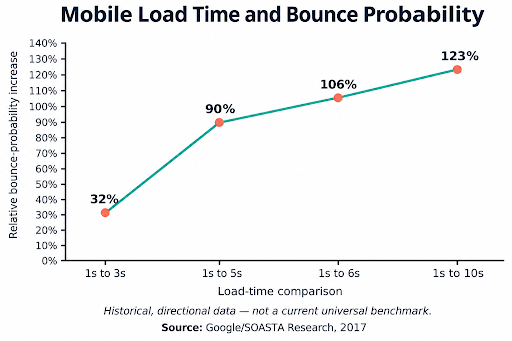
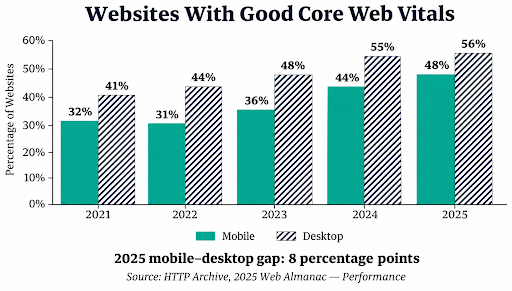
A clear offer still fails when the page loads slowly, shifts during interaction, or hides the form behind a broken mobile layout. Check real-user Core Web Vitals and test the full inquiry path on common phones. Google's current good thresholds are LCP at 2.5 seconds or less, INP at 200 milliseconds or less, and CLS at 0.1 or less at the 75th percentile.
Then inspect the handoff. Who receives the inquiry? How quickly is it reviewed? Is the source visible? Is there a clear owner and next step? A conversion-focused web design and development approach should connect the page experience to a working business process. A polished form that disappears into an inbox is decoration, not lead generation.
Page-to-Enquiry Audit Matrix
How Do You Decide What to Fix First?
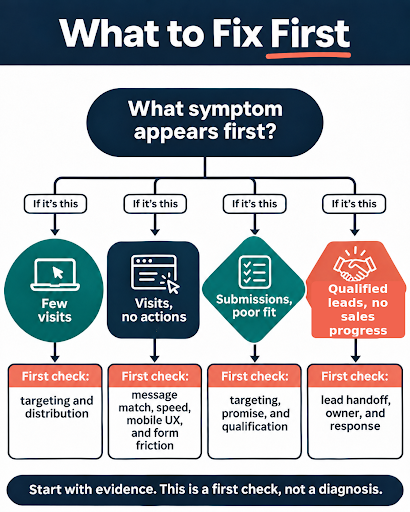
Fix the earliest stage where evidence becomes weak. If high-intent visitors never reach the page, work on targeting and distribution. If they arrive and leave immediately, inspect message match, speed, and mobile rendering. If they start but do not submit, inspect form friction and errors. If submissions arrive but are poor fits, tighten the promise, targeting, and qualification. If qualified inquiries arrive but stall, the website may not be the primary problem.
Change one meaningful variable at a time and record the date. Compare qualified-lead rate for the same page-source segment, not the whole site. A simple calculation is: qualified leads divided by relevant sessions, multiplied by 100. Use a long enough period to avoid treating a few visits as a trend.
When Should You Buy More Traffic?
Increase traffic only after the enquiry path works, tracking is trustworthy, and the target segment produces acceptable lead quality. More traffic can then help you test and scale a functioning path. It cannot rescue an unclear offer or a broken handoff.
For paid campaigns, align search terms, ads, landing pages, and conversion signals before raising spend. A measured PPC management program should optimize toward actions that represent real business value, not whichever click is easiest to count. Scale the page-source combination that creates qualified opportunities, not the channel total that produces the prettiest traffic graph.
Frequently Asked Questions
Turn Existing Traffic Into Better Inquiries
You do not need another traffic push to learn where the current path breaks. Start with one high-intent landing page, verify measurement, trace the visitor's decision, and fix the first proven barrier.
A useful audit ends with a prioritized test, an owner, and a success metric. Need an outside view of the page, traffic source, and inquiry path? Talk with Aesthetics Digital about your website and marketing goals.

At Aesthetics Digital, big ideas deserve bold execution.
Table of Content