




A useful Halloween campaign does not require a studio, elaborate costumes, or a giant giveaway. It needs a recognizable piece of your business, a simple seasonal idea, and one clear action for the customer.
That action might be voting, saving a tip, visiting your location, placing an order, or booking before a deadline. When the goal is clear, a phone and an hour of focused work can produce useful content. That beats a polished post with no clear next step.
Below are ten low-cost ideas, each with a format, an example, and a caption you can adapt. Pick three that match your business and run them as a short sequence.
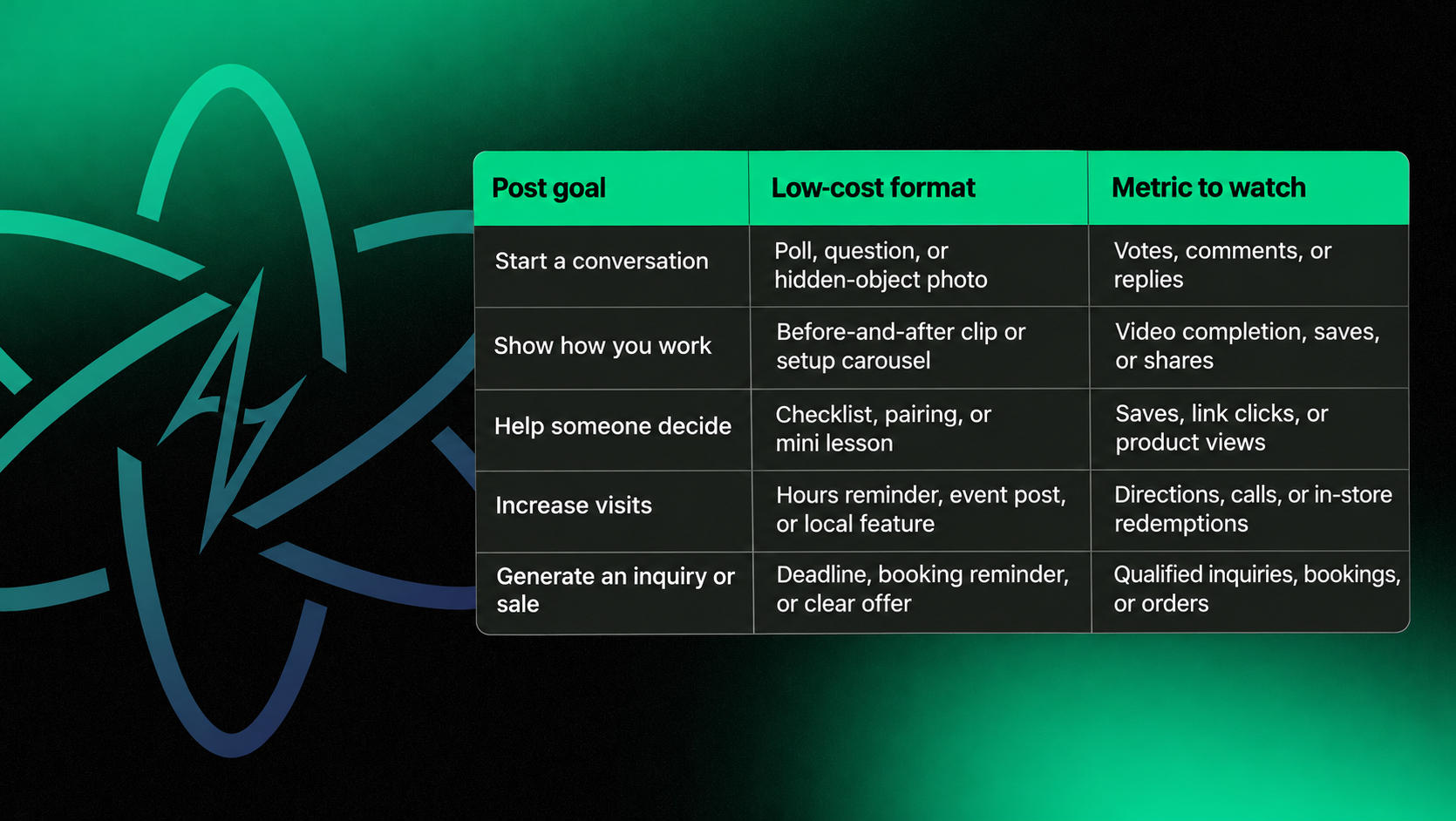
Start with the job of the post
Before adding pumpkins to anything, decide what the post should accomplish.
- Start a conversation: Ask people to vote, answer, or share.
- Show how you work: Reveal a process, transformation, or team member.
- Help someone decide: Explain a product, service, deadline, or useful difference.
- Increase visits: Connect the post to a location, event, or local partner.
- Generate an inquiry or sale: State the offer and next step clearly.
Halloween content should support your wider content marketing strategy. The holiday theme may earn attention. Your business goal determines what that attention needs to do.
1. Let customers vote on a seasonal choice
Give the audience two real options. A bakery might compare two cupcake designs. A salon could ask which nail-art palette should be featured. A contractor could ask which home problem feels scarier: a mystery leak or a flickering light.
Format: Story poll, two-image carousel, or short feed post.
Caption: "You choose the Halloween feature. Ghost Mode or Monster Mash? Vote below, and we will reveal the winner tomorrow."
Follow up with the result. The second post proves that the vote mattered and gives you another reason to appear in the feed.
2. Film a before-and-after transformation
The change is the story. Decorate a display, prepare a seasonal order, refresh a treatment room, package a product, or turn a normal workspace into an event setup.
Format: A five-to-ten-second vertical video filmed from the same position before and after.
Caption: "Same space, different October energy. Which detail did you notice first?"
Keep the brand recognizable. Seasonal content should still feel like it belongs to the same business customers see on your website.
3. Show the setup customers usually miss
Record the preparation behind a product, appointment, service, or event. Show the tools, ingredients, sketches, materials, packaging, or checklist. Add a few short labels so viewers understand what is happening without sound.
Format: Time-lapse, three-clip Reel, or photo carousel.
Caption: "The finished result takes seconds to see. Here is what happens before it reaches you."
Service businesses can use this approach to show the work behind the final result.
4. Give the team playful Halloween job titles
Ask willing team members to choose a simple seasonal title tied to what they actually do. A bookkeeper becomes the Receipt Rescuer. A designer becomes the Revision Wizard. A customer-service lead becomes the Vanisher of Voicemails.
Format: Staff carousel or quick lineup video.
Caption: "Meet the people keeping the scary stuff under control. Swipe for our unofficial Halloween job titles."
Participation should be voluntary. Get permission before posting an employee's image, and keep the joke kind enough to survive Monday morning.
.png)
5. Build a practical product or service pairing
Pair two products that are commonly used together, or explain two services that solve consecutive parts of the same problem. A discount is optional. Convenience and clarity can be the value.
Format: Flat-lay photo, carousel, or talking-head explanation.
Caption: "A frighteningly practical pair: [item or service one] plus [item or service two]. Best for [specific need]. Available through [date]."
If the post supports a paid campaign, the same clear offer can carry into a focused PPC campaign. Do not make the organic caption depend on an ad to explain the terms.
6. Turn a common mistake into a mini horror story
Use the Halloween theme to teach one useful lesson. A dentist might cover the after-candy habit people forget. A roofer could show the small sign of water damage homeowners ignore. A retailer could explain a return-policy detail customers should check before ordering a costume.
Format: Three-slide carousel: the mistake, why it matters, and what to do.
Caption: "Today's small-business horror story: [common mistake]. Here is the two-minute fix before it becomes a much bigger problem."
Specific advice gives people a reason to save the post. It also fits naturally into a broader digital marketing plan.
7. Hide a seasonal object in a real business photo
Place a small pumpkin, paper ghost, or branded object somewhere in a normal photo of your shop, office, menu, project, or workspace. Make it easy enough to spot on a phone.
Format: Single image, carousel, or Story with the answer on the next frame.
Caption: "A tiny pumpkin wandered into today's photo. Can you find it before the next slide gives the game away?"
The picture should still show something useful about the business. A hidden-object game works harder when customers also notice a new display, service detail, or location feature.
8. Invite customer photos with clear permission language
Ask customers to share something connected to your business: a pet costume, front-porch display, seasonal order, themed manicure, desk setup, or family activity.
Format: Story prompt or feed post with simple submission directions.
Caption: "Show us your Halloween setup. Tag @[business] and use #[branded tag] if you are comfortable with us resharing your post."
Ask before reusing a customer's photo or words. If an endorsement involves a gift, discount, free product, or contest entry, make the relationship clear and hard to miss. FTC disclosure guidance explains the disclosure requirements. A vague hashtag may not give customers enough context.
9. Publish a saveable Halloween checklist
Create a short list that helps customers prepare for the final days of October. A restaurant might share reservation and pickup reminders. A retailer can list ordering deadlines. A local service business can publish holiday hours and emergency contact information.
Format: Four-to-six-slide carousel or a clean text graphic.
Caption: "Save this before Halloween weekend: [item one], [item two], [item three], and the detail everyone forgets: [item four]."
If your hours change for an event or holiday, update the website and listings too. Google recommends setting special hours in Business Profile for short-term schedule changes, including holidays and special events.
10. Pair a last-call post with a recap
Clear deadlines help customers plan. Publish the final order time, event schedule, holiday hours, or last appointment availability. Afterward, share a short recap. Thank participants and record what happened.
Format: Countdown Story followed by a photo carousel or recap Reel.
Caption before: "Last call for [offer or event]. Order or book by [time and date] so you are not trying to solve it in costume."
Caption after: "You showed up, dressed up, and made our week. Here are a few favorite moments from [event or campaign]. Thank you, [community]."
The recap extends the life of the campaign and gives next year's planning a starting point.
Choose three ideas for a simple campaign
Use one idea from each stage:
- Invite participation: Run the poll or hidden-object post first.
- Provide value: Publish the behind-the-scenes clip, transformation, or checklist next.
- Make the next step clear: Finish with the pairing, deadline, event, or booking post.
This sequence moves from attention to usefulness to action without turning every post into a sales pitch.
Produce the campaign in one focused session
.png)
Use this 60-minute workflow:
- Write one goal for the campaign.
- Choose three ideas from the list above.
- Photograph the team, workspace, product, process, and one seasonal detail.
- Film a beginning, middle, and result for one short video.
- Draft all three captions and replace every bracket with a real detail.
- Confirm the dates, links, hours, permissions, and offer terms.
- Schedule the posts in sequence.
Short-form content does not need a large production budget. Give the viewer a clear setup, useful development, and next step. Keep the edit tight enough to understand without sound.
Check contests and collaborations before publishing
If a post includes a prize, creator, customer endorsement, or entry requirement, stop for a short compliance check.
- State the eligibility, dates, prize, selection method, and contact process.
- Follow the current promotion rules for every platform involved.
- Disclose payment, gifts, discounts, or contest entries connected to an endorsement.
- Get permission before republishing identifiable customer content.
- Never ask a winner to pay to receive a legitimate prize. The FTC warns that real prizes are free.
This is marketing guidance, not legal advice. Promotion laws and platform terms can vary. Seek qualified review when the prize, audience, or entry mechanics create meaningful risk.
.png)
Measure the action the post was built to encourage
Match the metric to the job:
- Poll votes, comments, and replies for participation posts
- Saves and shares for checklists and tips
- Profile visits and website clicks for discovery posts
- Calls, bookings, orders, and qualified inquiries for offer posts
- Approved customer submissions for community posts
Record the goal, post, and outcome in one place. A consistent marketing KPI process turns seasonal activity into a lesson your team can reuse.
Make the holiday recognizable, but keep the business useful
Halloween is the creative wrapper. Your customer still needs a reason to care.
Choose three ideas you can create with the people, expertise, products, and space you already have. Give each post one job, verify the details, and make the next step obvious.
Need a repeatable content system instead of another last-minute seasonal post? Talk with Aesthetics Digital about your content strategy.

At Aesthetics Digital, big ideas deserve bold execution.
Table of Content



%20(1).png)


.svg)

.svg)
.svg)


.svg)