



.jpg)
Real talk.
Your design work doesn't just happen inside Figma or Webflow. It happens in the browser:
- Researching competitors
- Inspecting fonts
- Checking how a layout breaks on mobile
- Matching a client's exact brand colour from their live website
And if you're doing all of that manually in 2026, you're leaving hours on the table every week.
Here's the deal: Chrome holds 65% of the global desktop browser market. That dominant market share has created the richest extension ecosystem in any browser and designers who tap into it are working smarter while everyone else is working harder.
According to Awesomic's 2026 Design Tools Report, designers who use dedicated browser extensions save an average of 40% of revision time compared to those relying on manual inspection alone.
Forty percent. That's not a rounding error, that's a day of your week.
What Chrome Extensions Do Professional Designers Actually Use?
Professionals aren't collecting 25 extensions and crossing their fingers. They're running a tight, purposeful toolkit, five to eight tools that solve specific, recurring friction points in their workflow.
The five below cover the five biggest time-sinks in browser-based design work:
- Colour
- Typography
- Design inspection
- Responsive testing
- Competitive research.
One extension per problem. No overlap, no bloat.
#1 — ColorZilla: The Colour Picker That Never Lets You Down
You're on a client's live site. They want their CTA button to match the exact terracotta from their homepage hero.
You hover, you click, you have the hex code in under three seconds.
That's ColorZilla, the most-used designer extension on the Chrome Web Store, and for very good reason.
What it does:
- Eyedropper tool: sample any colour from any pixel on any webpage
- Instant HEX, RGB, and HSL output, ready to paste into Figma or CSS
- Built-in gradient analyser: reads CSS gradients and outputs them as code
- Colour history log: revisit every colour you've ever sampled
- Full page colour palette: extracts an entire site's colour system in one click
Why we love it: Brand auditing used to mean screenshot → colour dropper → Figma.
ColorZilla collapses that to a single hover. It's the kind of tool that makes you wonder how you ever worked without it.
Price: Free | Manifest V3: ✅ Compatible
#2 — Fonts Ninja: Identify Any Font on Any Website in One Hover
You're browsing a beautifully designed landing page. The heading typography is perfect, exactly the vibe your client has been chasing.
But what font is it?
Before Fonts Ninja, that was a five-minute detective exercise. Now it's a single hover.
What it does:
- Hover over any text on any website to instantly reveal font family, size, weight, and colour
- Live preview: test how the font looks on your own text before committing
- Bookmarks fonts you want to revisit — your own personal typography library
- Direct links to purchase or download the font from its source
- Shows CSS font-stack fallbacks, not just the primary typeface
Why we love it: Typography is one of the most time-consuming parts of design research. Fonts Ninja eliminates the guesswork entirely.
And unlike WhatFont (the lightweight alternative), Fonts Ninja is built for designers who want to collect and explore typefaces, not just identify them.
Price: Free (identification) / $3.99/month Pro | Manifest V3: ✅ Compatible
#3 — CSS Peeper: Inspect Design Systems Without Opening DevTools
Here's the thing about Chrome DevTools: it's powerful. It's also overwhelming if you just want to know what padding a card component is using.
CSS Peeper is DevTools, but filtered for designers.
What it does:
- Click any element on any live page to see its clean design properties: colour, font, spacing, border radius
- Exports every colour and asset used on an entire page in one click
- Extracts full brand palettes from competitor sites — useful for client research and positioning
- Shows design properties in designer language (not raw DOM code)
- Identifies reused components across a design system
Why we love it: When Aesthetics Digital's team audits a client's existing site before a web design project, CSS Peeper is the first tool we reach for.
It turns a 30-minute manual inspection into a 5-minute overview. It's also invaluable for competitive design audits, getting a competitor's exact spacing, radius, and colour system in seconds.
Price: Free | Manifest V3: ✅ Compatible
#4 — Responsive Viewer: Test Every Device Without Owning Every Device
We've all been there. Design looks perfect on desktop. Client opens it on their iPhone 14. Everything has collapsed into a sad pile of misaligned boxes.
Responsive Viewer stops that from happening before it reaches the client.
What it does:
- Displays any webpage across multiple device sizes simultaneously in one view
- Synced scrolling: scroll all device previews at once, spot layout breaks instantly
- 52 device profiles built in, plus custom screen sizes
- One-click screenshots of all viewpoints for design documentation or client presentations
- Works on any live URL, not just local builds
Why we love it: Mobile traffic now accounts for over 60% of global web traffic. A design that looks beautiful on a 1440px monitor and breaks on a 390px iPhone isn't a good design, it's half a design.
Responsive Viewer is the fastest way to catch those breaks without owning every device on the market.
This pairs directly with our web design and development services, we test every build across 12+ device profiles before delivery.
Price: Free | Manifest V3: ✅ Compatible
#5 — Wappalyzer: Know Exactly What Your Competitors Are Built With
A client asks you to redesign their site to perform as well as their top competitor. Before you plan anything, you need to know what that competitor is built on.
One click. Wappalyzer tells you everything.
What it does:
- Reveals the complete tech stack behind any website: CMS, framework, analytics, CDN, hosting
- Identifies if a site runs on WordPress, Webflow, Shopify, React, Next.js, or dozens of other platforms
- Detects marketing tools: Google Analytics, Meta Pixel, HubSpot, Intercom, and more
- Useful for client discovery (understanding their current setup before proposing a redesign)
- Invaluable for agency competitive analysis and technology scouting
Why we love it: Wappalyzer is the Swiss Army knife of the five. It's not just a design tool, it's a content marketing and sales research tool too.
Before we propose a Webflow or WordPress build to a client, we scan their competitors to understand the technical landscape they're operating in.
It makes every strategy conversation sharper.
Price: Free (basic) / Paid plans for bulk analysis | Manifest V3: ✅ Compatible
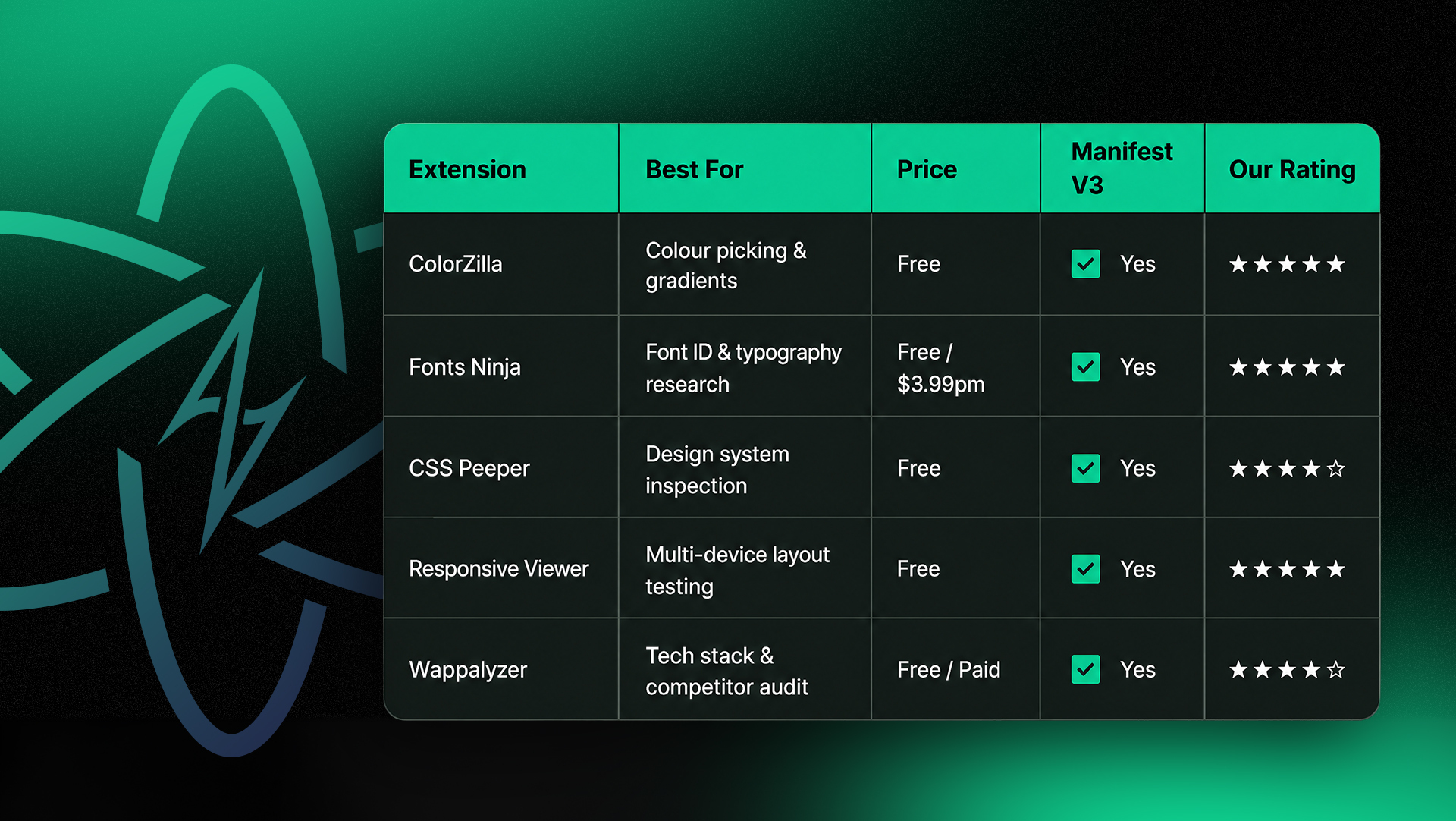
Quick Comparison: 5 Best Chrome Extensions for Designers at a Glance
Do Chrome Extensions Slow Down Your Browser?
Short answer: Only if you're careless about which ones you install.
The golden rule of extensions in 2026:
Install what you use weekly, audit quarterly, uninstall anything that doesn't earn its place.
A browser with 25 active extensions is a slow browser. A browser with 5 purpose-built extensions is a weapon.
All five extensions in this list are lightweight and run passively, they only activate when you click them. None of them introduce background processes that drain memory or compromise performance.
They've also all cleared Chrome's Manifest V3 requirements, the new security standard Google enforces across all Chrome extensions from 2024 onwards.
Also worth reading: our take on 10 things to remove from your website immediately, the same performance-first mindset applies to your browser.
Need a Website That Actually Converts? Let's Talk
Extensions make researching and auditing faster. But the design work itself, building a site that's fast, beautiful, and drives leads for your business, that's where Aesthetics Digital comes in.
Our team uses every tool on this list daily. We've delivered 1,200+ projects for businesses across Delaware and beyond.
From roofing companies to med-spas to SaaS brands, and every single one starts with a research-first, design-second approach.
Whether you need a brand-new website, an SEO overhaul, or a full digital marketing strategy, we'd love to show you what a strategy-first agency actually looks like.
Frequently Asked Questions
At Aesthetics Digital, big ideas deserve bold execution.
Table of Content


%20(1).png)


.svg)

.svg)
.svg)


.svg)